Jul 17, 2026·8 min read
Budget Pacing
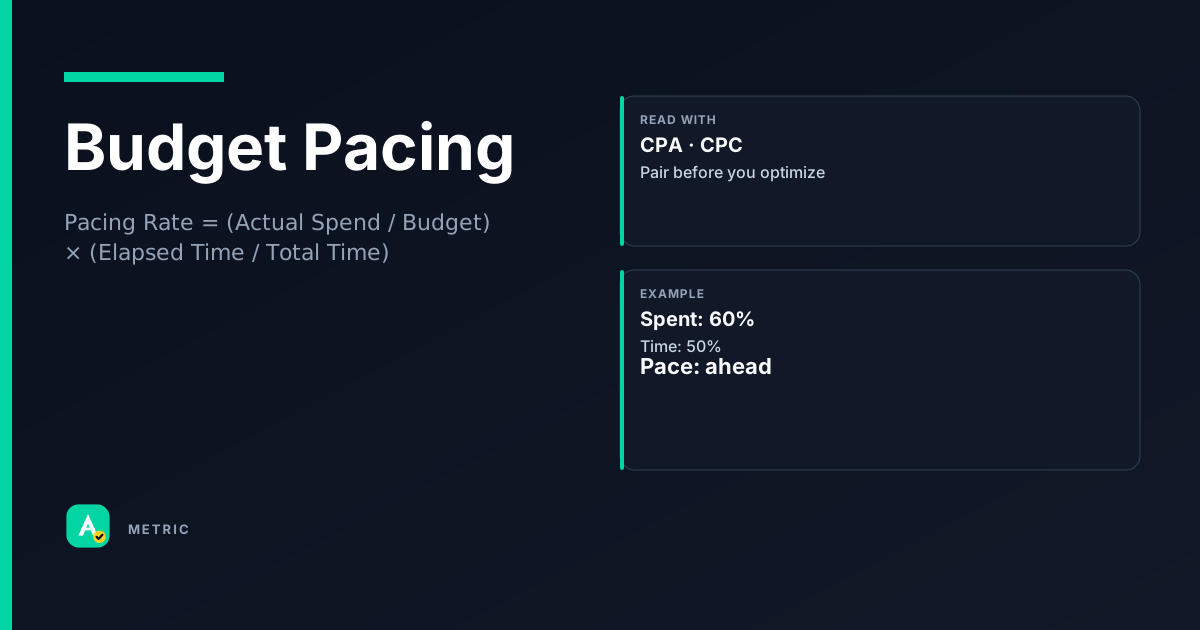
Budget Pacing is the rate at which a campaign spends its daily or lifetime budget relative to the elapsed time in the flight. It answers: “Am I on track to spend the full budget by the end of the period?” Pacing is not a success metric on its own — it must be judged alongside CPA and ROAS to avoid spending fast but poorly.
What Budget Pacing is
Budget pacing measures whether a campaign’s spend is aligned with the passage of time. A perfectly paced campaign spends 50% of its budget halfway through the flight, 25% at the quarter mark, and so on.
Platforms offer two common pacing styles:
- Even pacing — the system tries to spend roughly the same amount each day (or hour).
- Accelerated pacing — the system spends as fast as the auction allows, often exhausting the budget early in the day or week.
Why it matters
Pacing is a diagnostic, not a goal. An underspending campaign may have weak bids, narrow audience targeting, or low ad quality. An overspending campaign risks exhausting the budget before high-value conversion windows close. The art is balancing spend velocity with CPA and ROAS.
So what? Check pacing daily during the first 48 hours of a new campaign. If spend is far behind schedule, inspect bids and audience size before raising budgets.
How it is calculated
The most common pacing metric is Pacing Rate, expressed as a percentage:
Pacing Rate = (Actual Spend / Budget) × (Elapsed Time / Total Time)
A value of 1.0 (or 100%) means spend is perfectly on track. Above 1.0 means overspending; below 1.0 means underspending.
Important caveats
- Platforms often report delivery pacing as a simple ratio of spend to budget, ignoring time. That ratio alone can mislead: a campaign that spent 60% of budget in 50% of time is actually pacing 20% ahead.
- Daily budgets reset every midnight (in the campaign’s time zone). A campaign that spent 90% of its daily budget by noon is overspending for that day, even if the lifetime pacing looks fine.
- Shared budgets (e.g., a portfolio budget across campaigns) complicate pacing because one campaign’s overspend can starve another.
Check your platform’s definition: Google Ads uses “budget pace” as spend / budget, while Meta’s “delivery” column shows estimated daily spend vs daily budget.
How to read it in a dashboard
Most ad platforms show a pacing bar or delivery indicator next to each campaign. The bar fills from left to right as spend approaches the budget. A common mistake is to treat a fully filled bar as “good” — it only means spend equals budget, not that the spend was efficient.
What to pair with pacing
- CPA or ROAS — A campaign pacing at 110% with a CPA 20% below target is a candidate for a budget increase, not a bid reduction.
- Impression share — If pacing is behind but impression share is high, the issue is likely budget too low for the audience size.
- Frequency — Accelerated pacing that drives high frequency (>3-4 per user per day) often signals audience exhaustion.
Easy mistake
A home-services advertiser saw their campaign pacing at 95% by day 5 of a 7-day flight and panicked, cutting bids. The real issue: the campaign was on track to spend the full budget, and CPA was actually improving. They should have let it run.
So what? Read pacing as a rate check, not a success signal. Always open the efficiency tab before touching budgets or bids.
What usually moves this metric
Pacing responds to changes in the auction dynamics. Here are the primary levers, from most to least direct:
Bid adjustments
- Raise bids — Increases win rate, which typically accelerates spend (but may raise CPA).
- Lower bids — Slows spend by losing more auctions; can improve CPA if the remaining wins are cheaper.
Audience & targeting
- Expand audience — More eligible users → more auction opportunities → faster spend.
- Narrow audience — Fewer auctions → slower spend; risk of underspend if the audience is too small.
Budget changes
- Increase budget — Allows more spend per day; may not accelerate pacing if the campaign already maxes out on available auctions.
- Decrease budget — Caps spend; can mask an underlying pacing problem if the campaign was already underspending.
Ad quality & creative
- Improve CTR / conversion rate — Higher quality scores lower effective CPC, letting the campaign win more auctions for the same bid → faster spend.
- Rotate stale creatives — Ad fatigue reduces CTR, which slows spend even if bids are unchanged.
Tradeoffs
Every pacing lever trades off against efficiency. The classic trap: “Just raise the bid to spend the budget.” That works in the short term, but CPA often rises faster than spend accelerates. A better sequence:
- Check audience size — is it large enough?
- Check ad quality — are CTR and conversion rate competitive?
- Only then adjust bids, and only by small increments (10-15%).
So what? Never optimize pacing in isolation. Always set a guardrail metric (max CPA or min ROAS) before touching any lever.
Formula
Many platforms report only spend / budget (ignoring time). Always check your platform’s definition before acting.
Scenarios
The Friday night spike
A retail campaign with a daily budget of $500 spends $400 by 2 PM on Friday. The pacing bar shows 80% with 10 hours left.
What happened: The campaign uses accelerated delivery. It won many cheap auctions early in the day. Fix: Switch to even delivery. If CPA is still good, the budget may be too low for the available demand — consider raising it. Takeaway: Accelerated pacing is fine for time-sensitive offers, but monitor frequency and CPA daily.
The ghost campaign
A B2B campaign has spent only 10% of its monthly budget after 15 days. The pacing bar is red.
What happened: The audience is too narrow (only 8,000 users) and bids are too low to win the few available auctions. Fix: Expand the audience by adding related job titles and interests. Raise bids by 20% and monitor CPA. Takeaway: Underspend often means the campaign simply cannot find enough eligible users at the current bid.
The budget ceiling
An e-commerce campaign paces perfectly at 50% spend after 5 days of a 10-day flight. CPA is 10% below target.
What happened: The campaign is efficient but the budget is fully used by day 8, missing the weekend sales peak. Fix: Increase the daily budget by 25% and switch to even delivery to spread spend across the full flight. Takeaway: Perfect pacing + good efficiency = opportunity to scale. Don’t leave money on the table.
Common pitfalls
Treating pacing as a success metric
Overreacting to early-day pacing
Seeing 60% spend by 10 AM and panicking leads to unnecessary bid cuts.
What to do instead: Wait until at least 50% of the day has passed. Many platforms front-load spend because they win cheap auctions early. Let the system stabilize.
Ignoring time zone differences
A campaign targeting the West Coast but managed from the East Coast may appear to underspend in the morning because the day hasn’t started for most users.
What to do instead: Check pacing relative to the campaign’s time zone, not your own. Use the platform’s delivery report with hourly breakdown.
Summary
Budget Pacing is a diagnostic rate check, not a success metric. Use it to spot delivery problems early, but always make decisions based on efficiency (CPA, ROAS) and audience health.
- Always pair pacing with an efficiency metric before changing bids or budgets.
- Even pacing is safer for evergreen campaigns; accelerated pacing works for time-sensitive offers.
- Underspend often signals audience or bid issues, not a budget problem.
Quick check
Confirm you understood this article.
boolean
A campaign that spent 50% of its budget in 50% of the flight time is pacing perfectly.
Select an answer to continue
References
- Google Ads Help — About campaign budget pacing (conceptual reference)
- Meta Ads Help — Budget and delivery concepts (conceptual reference)
- IAB Digital Advertising Measurement Guidelines — General delivery and pacing definitions (conceptual reference)
For learning only. Not advice on bids or spend.
You may also like
Metrics
Cost Per Acquisition (CPA)
Cost Per Acquisition (CPA) measures the total advertising cost divided by the number of convers…
CostMetrics
Cost per click (CPC)
Cost per click (CPC) measures the average price an advertiser pays each time someone clicks the…
CostMetrics
Return on Ad Spend (ROAS)
Return on Ad Spend (ROAS) measures the revenue generated for every dollar spent on advertising.
PerformanceMetrics
Bid Response (Bid Resp)
Bid Response is the message a bidder sends back to an exchange after receiving a Bid Request.
Auction